Insight IQ · Broker Partner Program
Find and fix the gaps that cause declines, before you submit.
Insight IQ reads your client’s Microsoft 365 environment and produces the controls evidence cyber carriers ask for. Cleaner submissions, fewer surprises, stronger renewals.
Why it pays for everyone
Better for the client, you and the carrier
Your client
Finds and fixes control gaps before the application, builds a stronger case for better terms, and keeps evidence on file.
You
Fewer surprises at submission, and every renewal starts with current evidence in hand.
The carrier
Receives evidence they can verify instead of checkbox answers, with monitoring that runs all year.
What you get
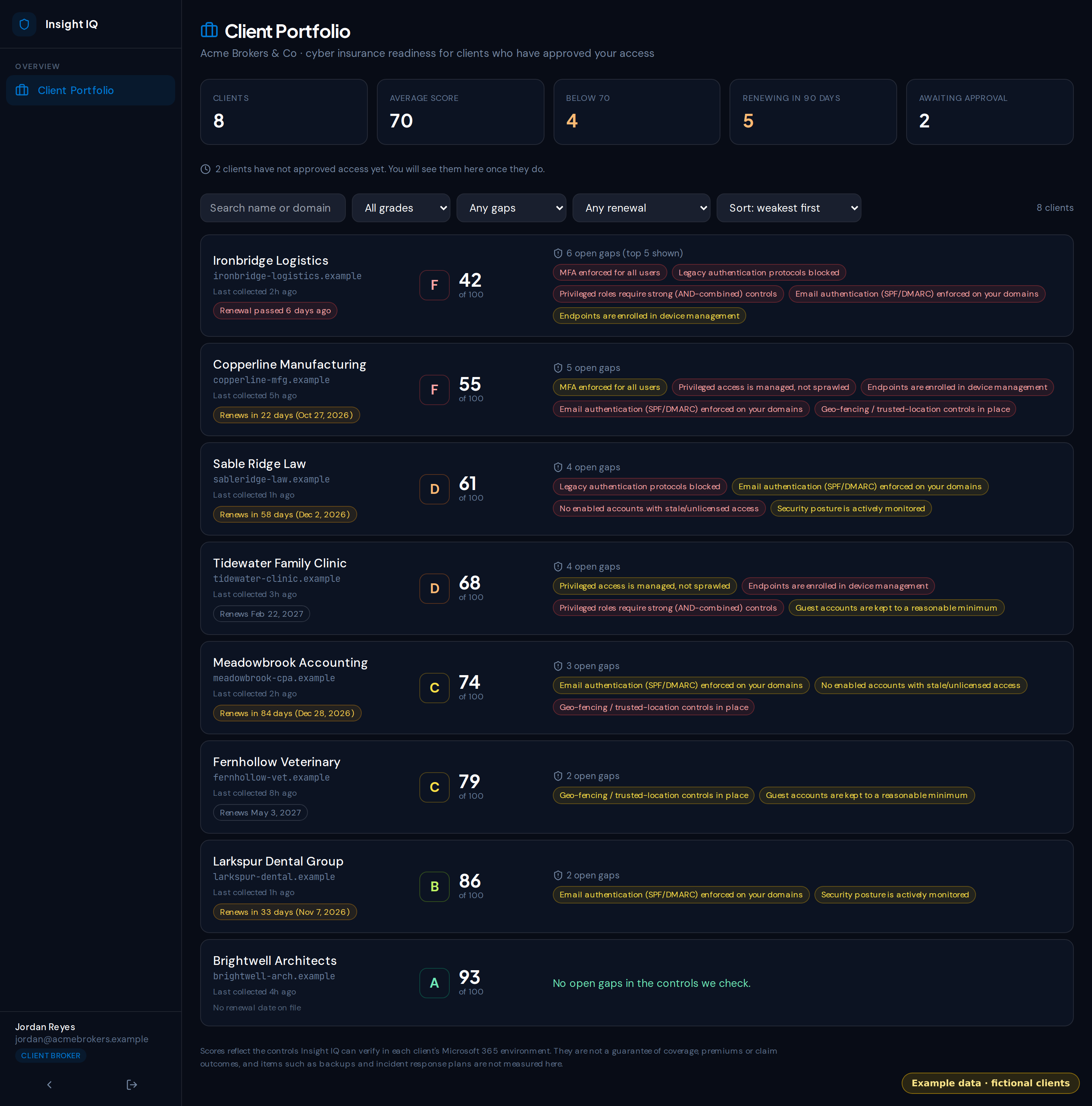
The Broker Portfolio Dashboard
Built with our first partners. Email reminders are next; early partners shape what comes after.
One view of every client’s cyber risk score
AvailableA portfolio dashboard showing each approved client’s readiness score, grade and top open gaps in one place, weakest client first.
Pre-filled application worksheet, evidence attached
AvailableA draft worksheet of common cyber insurance application questions, pre-filled with suggested answers from what Insight IQ verified in Microsoft 365, with the evidence shown. Items it cannot verify, like backups, are marked for the client to attest. The client generates it and shares it with you.
Renewal reminders 90 days out, evidence packet on demand
AvailableYou see each client’s renewal date and a countdown, plus a count of renewals coming up in the next 90 days. Clients get an in-app reminder and can generate a renewal evidence packet to share with you. Email reminders are next.
Gap flags before submission, not after a decline
AvailableA prioritized list of the control gaps that commonly cause declines: MFA coverage, privileged access, legacy authentication, email authentication and more.
See it in action
Your whole book, weakest client first
A client portfolio that shows every approved client's readiness score, grade, top open gaps and renewal date, so you know who needs attention before a submission and whose policy renews soon.
Your client stays in control
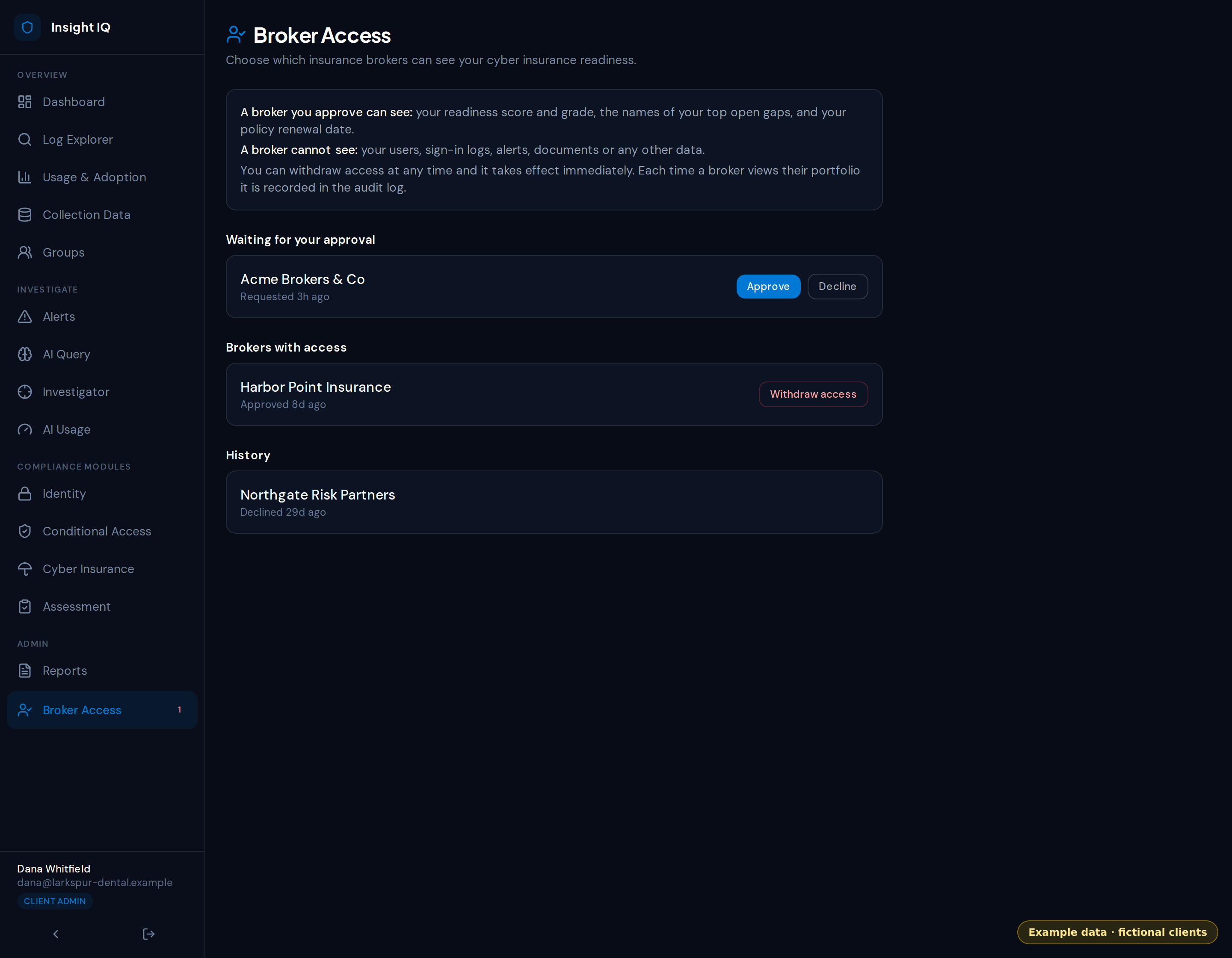
You only see a client after their own administrator approves you. They see exactly what you can view (score, grade, the names of top open gaps and the policy renewal date, never their users, logs or alerts), can withdraw access at any time, and every view of the portfolio is recorded in their audit log.
Pricing
Flat annual software fee. No commission sharing.
What you pay is separate from what your client pays.
What you pay: the broker or agency
Starter
$500 /month
Up to 25 monitored clients
Growth
$1,000 /month
Up to 75 monitored clients
Agency
$1,500 /month
Unlimited monitored clients
Billed as a flat annual software fee.
What your client pays: the insured business
Insurance Readiness Assessment
$1,500 to $5,000
One time, priced by size. A pre-filled cyber application draft plus a controls evidence report. Credited toward an annual plan.
Remediation
From $2,500
Fixed scope, quoted up front. MFA, conditional access, backups and an incident response plan.
Monitoring · Essentials
$199 /month
Under 25 users
Monitoring · Pro
$399 /month
25 to 100 users
Monitoring · Plus
$799 /month
100 to 250 users
Monitoring · Enterprise
From $1,500 /month
250+ users
12-month term, billed annually and timed to your policy renewal. Month-to-month is available at +20%.
Try it with three clients, free for 60 days
Sign the partner agreement and pilot Insight IQ on three of your clients at no cost. If it does not make your submissions and renewals easier, walk away.
Start a pilotQuestions
How the program works
- Do you share commission?
- No. The broker fee is a flat annual software fee. Your commissions stay 100% yours.
- Who does the client contract with?
- The client contracts with Camelot directly for monitoring and any one-time work. Your fee covers dashboard access and your monitored-client slots. This keeps the arrangement clear for everyone.
- What counts as a monitored client?
- A client with an active connection to their Microsoft 365 tenant. You are not charged twice for the dashboard if a client also buys monitoring directly.
- What can you see about my client?
- Only what the client allows. Their Global Administrator grants your access in the app first, and can withdraw it at any time.
- What does the client pay?
- See the client pricing below. The readiness assessment is credited toward an annual plan.
Insight IQ finds and helps fix control gaps. It does not guarantee coverage, premiums or claim outcomes.